
If an AI agent visits your site, it should not have to guess which button matters or what a form field means.
- agent ready websites
- WebMCP
- agentic web
- AI agents
- agent friendly websites
Browser agents are moving from reading pages to acting inside them. Business sites need a safer interface for that.
An agent-ready website does not make an AI system guess how to complete a task. It still works for people, while giving the agent clear signals about available actions, required data, and the point where a person must confirm the next step.
Most sites do not need a complex agent layer tomorrow. They do need to consider whether a browser agent can read the page, understand the task, use the correct form, and avoid unsafe actions alongside the usual work on speed, design, and SEO.
What is an agent ready website?
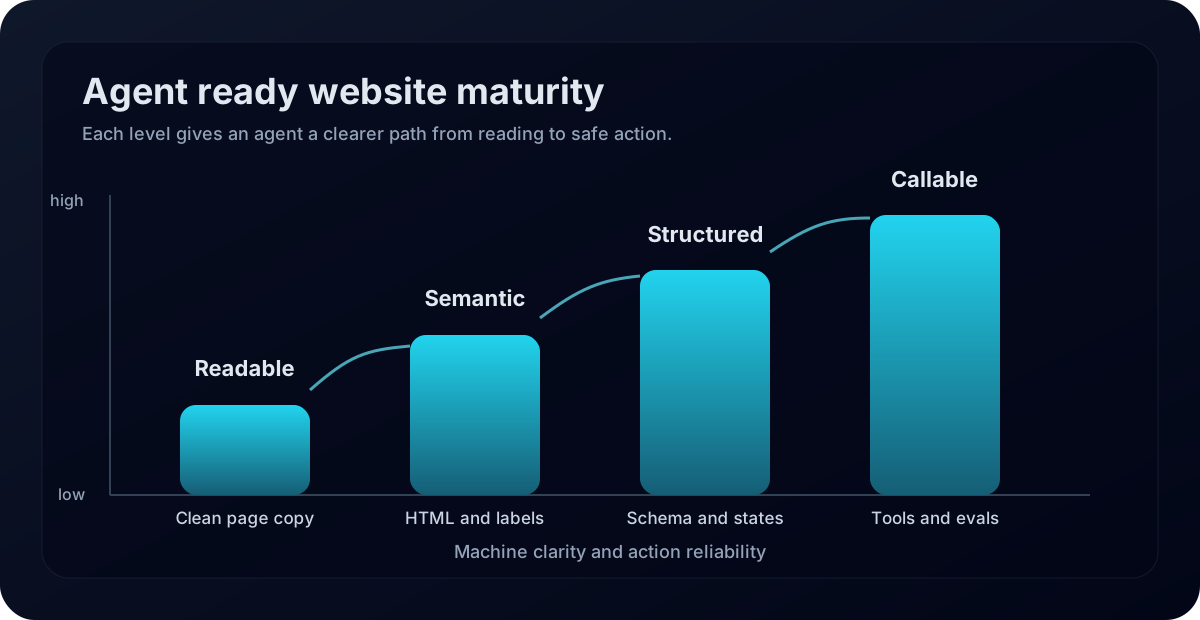
An agent-ready website is a site that AI agents can read, understand, and act on without unnecessary inference. It uses clear page content, semantic HTML, stable layouts, structured data, named actions, safe confirmation steps, and tests for the tasks agents are likely to perform.
This matters because agents do not browse like people. They may use screenshots, raw HTML, the accessibility tree, browser tools, or structured site tools. The cleaner those signals are, the less the agent has to infer from visual design alone.
The Chrome team from Google (GOOGL) put the issue plainly in its agent friendly website guidance updated April 1, 2026: agents can use screenshots, HTML, and the accessibility tree, and each view has gaps. The job for site teams is to provide clean signals across all of them.
Why does WebMCP matter now?
WebMCP matters because it gives the web a more explicit way for browser agents to act on a page. Chrome published WebMCP guidance on May 18, 2026, describing it as a proposed web standard that lets websites expose structured tools for AI agents through JavaScript and annotated HTML forms. The same page says WebMCP is available behind a Chrome flag for local development and is planned for an origin trial in Chrome 149.
A tool interface gives the agent a labeled control panel. Instead of locating a button, filling a field, clicking, waiting, and guessing what changed, it can inspect the available action, accepted inputs, relevant state, and expected result or error.
That does not remove the need for human first design. WebMCP tools execute visibly on the page, inside the browser context, so the user can still see what is happening. For sensitive actions such as purchase, booking, account changes, or support escalation, the site should still require clear user confirmation.
How is WebMCP different from MCP?
WebMCP and MCP are related ideas, but they solve different jobs. MCP is a server side way for agents to connect with tools, data, and workflows. WebMCP is for the live website inside a browser tab. It helps an agent understand and use the user interface the person is already looking at.
The Chrome comparison page updated May 19, 2026 says teams do not need to choose one or the other. MCP can handle core logic and background tasks. WebMCP can help a browser agent act on the website when the user has the page open. That distinction is important for business teams because not every workflow belongs in the browser.
| Site task | Make readable first | Make callable later | Risk control |
|---|---|---|---|
| Lead form | Clear labels, visible fields, direct page copy. | Tool that maps user details into the right fields. | Show a review screen before submit. |
| Product search | Structured product facts and useful filters. | Tool that searches by price, fit, stock, and policy. | Return exact product facts and current limits. |
| Booking flow | Plain date, location, party size, and policy fields. | Tool that checks options without final booking. | Require user approval before payment or reserve. |
| Support request | Current help pages and clear issue categories. | Tool that routes the issue and attaches context. | Avoid exposing private account data by default. |
| Account change | Obvious states and plain confirmation messages. | Tool for narrow actions after identity checks. | Use stronger confirmation and audit records. |
What should business leaders make agent ready first?
Start with task flows where the user already wants help and where mistakes are easy to detect. Good candidates include quote requests, product fit searches, appointment discovery, support routing, saved cart review, warranty checks, and internal admin diagnostics. Weak candidates include vague browsing, high risk account changes, and anything where the agent would need to infer policy or legal meaning from incomplete copy.
Write the first pilot around one journey. List the user intents and allowed actions, define the inputs and failure responses, and mark the step that needs human approval. That gives the team something it can test and review.

How does this change SEO, AEO, and GEO?
Agent ready websites add another layer on top of normal search work. SEO still needs crawlable pages, useful content, internal links, performance, and structured data. AEO still needs direct answers to real questions. GEO still needs entity clarity, public proof, and citation readiness. Browser agents add a fourth concern: can the site support safe action once the answer is found?
This is where a lot of business sites will be exposed. A page may rank well but still be hard for an agent to use. A form may look beautiful but lack labels that connect to fields. A booking flow may work for a human but shift layout in a way that confuses visual navigation. A support page may explain policy in prose but not expose a clear next action.
Strong AI visibility will need both citation and completion thinking. Can an AI answer cite the page as a source? Can a browser agent help the user complete the next step without guessing? The best public content will answer the question, prove the claim, and route the task clearly.
What should engineering teams test before launch?
Test the tool contract before you trust the journey. Chrome WebMCP eval guidance from May 19, 2026 says teams should confirm that agents know when to call a tool, how to execute it, which parameters to use, and what result is acceptable. It also points out that classic deterministic tests still matter for code that does not communicate with a model.
In practice, that means two kinds of tests. Deterministic tests confirm the tool logic, errors, dependencies, and interface state. Agent evals check whether the model picks the right tool, uses the right arguments, respects order, and recovers from partial failure. A support routing tool that sends a billing issue to the wrong queue is not ready. A checkout helper that skips a coupon failure and completes at full price is not ready.
What does this look like for a real business?
Picture a service business with a quote request flow. Today, a user reads the service page, fills a form, chooses a date, adds notes, and waits for a reply. An agent ready version still has the same public page, but the form has clean labels, the service area facts match the rest of the site, the policy page explains response times, and the agent can call one narrow tool to prepare a quote request for review.
The user confirms the request after reviewing the summary. The agent gathers the required fields without inventing a price, promising availability, or submitting private data without review. That leaves the business with the information it needs and saves the customer some form filling.
What citation environment supports agent ready websites?
For agent ready website advice, AI tools are more likely to trust official browser docs, web standards drafts, accessibility guidance, structured data docs, security docs, developer changelogs, and real implementation case studies. A brand article can explain the business method, but the method is stronger when it lines up with those public sources.
The same idea applies to your category. If your site says one thing, your help center says another, your directories show old service names, and customer reviews use different language, an AI system has to choose which version to believe. Agent readiness starts with consistent public facts before it becomes a browser tool project.
What should teams do this quarter?
Run a small readiness audit before writing code. Pick ten important pages and one task flow. Check whether the page has semantic HTML, clear labels, stable layouts, matching structured data, current support facts, obvious next actions, and a clean approval point for sensitive steps. Then decide whether WebMCP is worth testing for that flow.
If it is, keep the first tool narrow. One task, one purpose, clear inputs, clear errors, and a visible state update. Do not expose every action on the site. Too many overlapping tools make it harder for the agent to choose correctly, and they make the risk review harder for the team.
Where Deploy Agentic fits
Deploy Agentic helps teams turn AI search and agent workflow ideas into practical systems with clean data access, review gates, testing, and useful outputs. For agent ready websites, that means starting with the page and the user journey, then deciding where a browser tool, backend tool, or human review step belongs.
For related reading, see the Deploy Agentic blog, the guide to AI crawler access audits, the AI SEO audit agent article, and the AI agent workflow automation article. The engineering section explains how Deploy Agentic thinks about system design, and the contact page is the clean next step when you want to map one pilot.
FAQ
What is an agent ready website?
An agent ready website is a site that AI agents can read, understand, and act on with less guessing. It uses clear content, semantic HTML, stable interaction patterns, structured data, safe confirmation steps, and tested tool interfaces when the site supports agent actions.
What does WebMCP do?
WebMCP is a proposed browser standard that lets a website expose structured tools to browser based AI agents through JavaScript and annotated HTML forms. It helps agents know what actions are available and how to use them.
Should every business implement WebMCP now?
No. Most businesses should first clean up semantics, accessibility, structured data, support pages, and high value task flows. WebMCP is worth testing where a user would benefit from an agent completing a form, search, booking, support, order, or account task inside a live browser tab.
Bottom line
Start by checking whether a browser agent can read your pages and use their semantic structure. Add a narrow tool where it reduces guessing, then test the whole journey before it affects revenue, support, or customer trust. The user should still be able to see and control sensitive steps.
Sources
- Chrome for Developers, May 18, 2026: WebMCP
- Chrome for Developers, May 19, 2026: 15 updates from Google I/O 2026
- Chrome for Developers, updated May 19, 2026: When to use WebMCP and MCP
- Chrome for Developers, May 18, 2026: WebMCP best practices
- Chrome for Developers, May 19, 2026: Evals for WebMCP
- web.dev, updated April 1, 2026: Build agent friendly websites
- WebMCP Draft Community Group Report, May 20, 2026
Pick one task flow and make it agent ready
Start with the page, the form, the public facts, and the approval step. Then decide whether a browser agent tool belongs in the flow.
Map the pilot flow